Short answer: NTAG213 is the best value when the tag only opens one short link; NTAG215 is the safe default for home automation, Amiibo and full vCards; NTAG216 is only worth it when you can name what will fill the extra 400 bytes. Nearly the whole decision comes down to user memory — 144 vs 504 vs 888 bytes.
Key takeaways
- If the tag only opens one short URL, NTAG213 is the most cost-effective buy.
- The most common failure: not enough memory for companion records — the phone shows a confirmation dialog on every tap.
- NTAG215 (504 bytes) holds a URL plus companion records — the safe default for automation.
- NTAG216 (888 bytes) is for large vCards, multi-language content and complex NDEF.
- A password is not encryption: for anti-counterfeiting you need NTAG 424 DNA or DESFire-class chips.

Every NFC tag listing buries one line in the fine print: the chip type. NTAG213. NTAG215. NTAG216. They look the same, they cost almost the same, and most buyers pick whichever is cheapest.
Then the tags arrive, and the tap doesn’t feel instant anymore.
Here is a real example that shows up again and again in smart home forums. Someone orders a batch of NTAG213 stickers to trigger a Home Assistant routine. They write the URL, add the companion records the app needs, and tap their phone. Instead of firing the automation immediately, a confirmation dialog pops up. Every single time. They unlock, tap the notification, wait for the app to open — the exact friction the physical tag was supposed to remove.
The tags weren’t defective. They were just too small.
The one spec that actually matters
An NFC tag’s chip determines two things: how much data it can hold, and what it can do with that data. Form factor, colour, adhesive and price are all downstream of that choice.
NTAG213, NTAG215 and NTAG216 all sit in NXP’s NTAG21x family. They share the same fundamentals:
- 13.56 MHz, ISO/IEC 14443 Type A
- Passive — no battery, powered by the reader’s field
- 7-byte UID
- 32-bit password protection
- NXP originality signature — a factory-written ECC signature that lets a reader verify the chip is genuine NXP silicon, not a clone
What differs is user memory, and that difference decides everything else.
| Spec | NTAG213 | NTAG215 | NTAG216 |
|---|---|---|---|
| User memory | 144 bytes (~137 usable in an NDEF message) | 504 bytes | 888 bytes |
| NFC Counter (tap count) | Not supported | Supported | Supported |
| Password protection | 32-bit | 32-bit | 32-bit |
| Originality signature | Yes | Yes | Yes |
| Typical relative cost | Lowest | Low | Mid |
| Best for | Short URL, social link, review link, simple redirect | Home automation, Amiibo, full vCard, multi-record tasks | Large vCard, multi-language content, complex NDEF |

What each chip is genuinely good for
NTAG213 — short links and simple redirects
If the tag only needs to open one URL, NTAG213 is the right buy and the better value. A Google review link, an Instagram profile, a menu page, a Wi-Fi credential — all of these fit comfortably inside 144 bytes.
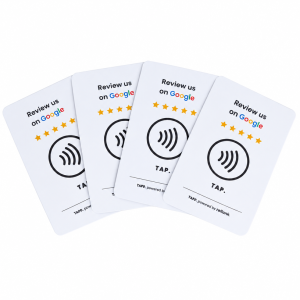
This is why NTAG213 dominates the highest-volume NFC categories: review cards and stickers, social-media tap cards, digital business cards with a single profile link. Ordering NTAG216 for that job is spending money on capacity you will never touch.
NTAG215 — the automation chip
This is where the extra few cents earn their keep.
Smart home platforms don’t just write a URL. They write a URL plus companion records — the extra data the app uses to recognise the tag and fire the routine without asking. Squeezing that into NTAG213 sometimes works and often doesn’t, and when it doesn’t, you get the confirmation dialog between the tap and the action.
NTAG215’s 504 bytes gives enough headroom for the URL and both companion records, so the tap fires immediately. It is also the chip used for Amiibo-style applications, and the sensible choice for a full vCard — name, title, phone, email, website, social links — rather than a bare link.
NTAG216 — room to grow
NTAG216’s 888 bytes covers the cases where content is bulky or might expand later: a vCard with multiple phone numbers and a full address block, multi-language text records, a tag that stores several records for different readers, or a project where you’d rather not re-order when the content grows.
Honest caveat: a lot of buyers default to NTAG216 “to be safe.” That’s usually over-specifying. If you can’t name what will fill the extra 400 bytes, NTAG215 is the better spend.
The hidden trap: why cheap tags break your automation
The confirmation dialog problem deserves its own section, because it is the single most reported NFC complaint in automation communities and it gets misdiagnosed constantly. What happens:
- The automation app writes a URL to the tag.
- It also wants to write companion records so the phone recognises the tag as “known” and acts without prompting.
- The total doesn’t fit. The app writes a partial record, or skips the companion records.
- On tap, the phone doesn’t recognise the tag as trusted, so it shows a dialog asking whether to open the link.
Buyers assume the tag is faulty, or that their phone is the problem. It’s neither — it’s capacity.

Worth knowing: the community is genuinely split on this. Some experienced smart home users report that NTAG213 works fine for automation triggers, on the basis that the tag only needs to store a short identifier URL and everything else is fetched from elsewhere — making anything larger a waste. Both camps are right, because they’re describing different setups:
- Tag carries only a bare URL, and you’re fine tapping a confirmation prompt → NTAG213 works.
- Tag needs companion records so the phone fires the routine without asking → NTAG213 can run out of room, and NTAG215 is the safe choice.
The practical test: if your platform offers to write anything beyond a plain URL — companion records, an app record, a tag ID — size for that, not for the URL alone. Since moving from NTAG213 to NTAG215 costs cents per unit in bulk, the safer default is NTAG215 unless you know your setup only writes a bare link.
One more thing before you blame the chip: some users on recent Home Assistant companion app builds have reported the confirmation dialog appearing even on tags with plenty of memory. If a setup that worked suddenly stops firing after an app update, check the app before you re-order hardware.
Four other specs buyers miss
Memory gets the attention, but these four cause just as many failures in the field.
Metal surfaces
A standard NFC sticker placed on metal will read badly or not at all — the metal interferes with the antenna’s field. If the tag goes on a fridge, a metal door frame, a machine housing or a metal counter, you need an anti-metal (on-metal) tag with a shielding layer. This is the most common “it worked on my desk, it failed in the install” story in the industry.
Adhesive and environment
An inlay that reads perfectly in the lab can fail at 60 °C, outdoors, on a curved surface or on a greasy kitchen counter. Match the adhesive and face material to the actual install conditions, not to the datasheet photo. For food-contact or microwave-adjacent applications, the antenna design matters too — some inlays are specifically engineered to resist arcing under microwave conditions.
Read range is antenna size, not chip
A bigger antenna reads from further away. NTAG216 in a tiny 12 mm tag won’t outperform NTAG213 in a 45 mm tag. If read range matters, specify the antenna, not the chip.
Locking
All three chips support a 32-bit password, and tags can be set to read-only so nobody rewrites them after deployment. For review cards and public-facing installations, this is worth doing — otherwise anyone with a writer app can point your card at a different URL.
Important distinction: password protection is not encryption. NTAG21x chips are not a security solution on their own. If your application is anti-counterfeiting rather than link-sharing, you need a chip with actual cryptographic mutual authentication (NTAG 424 DNA or MIFARE DESFire class), not a password-protected NTAG213.
Quick decision checklist
Answer these in order and the choice makes itself:
- What goes on the tag? One short URL → NTAG213. Automation, Amiibo or a full vCard → NTAG215. Large or multi-language content → NTAG216.
- Is it going on metal? Yes → anti-metal construction, regardless of chip.
- Indoor, outdoor or food-adjacent? Match face material and adhesive to the real environment.
- Does read range matter? Specify antenna size, not chip.
- Is it public-facing? Set a password and consider locking to read-only.
- Is it security-critical? NTAG21x is the wrong family. Move up to a cryptographic chip.
Frequently asked questions
Do customers need to install an app to read the tag?
No. Modern iPhones (XS and newer) and most Android phones support background tag reading — the tag is read and the link opens without any app on the customer’s side.
Can I rewrite the tag later if my link changes?
Yes, unless you have locked it to read-only. This is a genuine advantage over a printed QR code, which is fixed at print time.
How much does the upgrade from NTAG213 to NTAG215 actually cost?
In bulk, moving from NTAG213 to NTAG215 is typically a difference of cents per unit. Against the cost of a failed rollout or a tag that annoys every user, it is not a close call.
Is NTAG216 worth it ‘just in case’?
Usually no. If you can’t name the data that will fill the extra memory, buy NTAG215 and spend the difference on a better face material or a larger antenna.
Where LOZAVY fits
LOZAVY has manufactured RFID and NFC tags, inlays and smart cards for over 16 years, with in-house chip encapsulation, printing, die-cutting and forming. We supply NTAG213, NTAG215 and NTAG216 across PVC cards, epoxy stickers, wristbands, key fobs and anti-metal constructions, with encoding and tap-testing before dispatch. Request samples for your project — tell us the chip, the surface and the quantity, and we will send tested units.
Get tested samples for your project
Tell us the chip, the surface and the quantity — we will send tested samples and a quote.
Sources: NXP NTAG21x datasheet specifications; field reports from smart home and Home Assistant communities; bulk pricing observed on B2B platforms, verified September–October 2026. Specifications should be confirmed against the current NXP datasheet for your specific order.